

Your direct connection to the Spectora platform. Whether you're an inspection company looking to sync your data with other tools, or a technology partner building an integration, the Spectora Public API gives you programmatic access to your inspection business data.
What You Can Build
The Spectora API is designed for two primary use cases:
Inspection companies can connect Spectora to 3rd party tools, such as CRMs — keeping agent relationships, client records, and inspection data in sync without manual exports.
Technology partners can build deep integrations that extend Spectora's capabilities, embed inspection data into their own platforms, or automate workflows across the home inspection transaction lifecycle.
Base URL
All API requests are made to:
Code
Authentication
The Spectora API uses API key authentication. Include your key as a Bearer token in the Authorization header of every request:
Code
API keys are scoped to your company and carry the permissions of your account. Keep your key secure — do not expose it in client-side code or public repositories. You can request your API key(s) here. You will need to have your Spectora login information available or already be logged into Spectora in the same browser.
API Design
The Spectora API follows the JSON
Terminology note: Some internal field names and route paths use Spectora's underlying data model terminology.
- Agents associated with your company are internally referred to as Connections. You will generally use the connection id for referencing them. Agents also have an agent id and separately an agent uuid — these are ids that reference the same agent globally, which may be helpful if your organization operates more than one instance of Spectora.
- Clients associated with your company are internally typically referred to as Contacts but may be referenced as Buyers when specifically associated to inspection data. You will generally use the contact id for referencing them across various endpoints.
Content Type Requirements: The default content type should be set to application/json for all POST and PUT calls. If you are including an image as part of the POST or PUT you will need to change the body to Multipart and pass data in key value entries with the key being formatted as data[attributes][field-name]. For the images specifically you will use data[attributes][image] and include your image file as the value. Supported image file types are: .jpg, .jpeg, .png, and .gif.
Relationships: Related resources (such as an inspection's custom fields or buying agent) can be included in a single response using the include query parameter, reducing the need for multiple round trips.
Pagination: List endpoints return paginated results. Use page[number] and page[size] parameters to navigate result sets. Response bodies include a meta.pagination object and a links object with first, prev, next, and last page URLs.
Partial updates: PUT requests on resource endpoints are partial by default — only fields included in the request body will be modified.
Rate Limiting
API requests are subject to rate limits. When a limit is exceeded, the API returns a 429 Too Many Requests response. Build retry logic with exponential backoff into your integration to handle this gracefully.
HTTP Status Codes
| Code | Meaning |
|---|---|
200 | Success — request completed, resource returned |
201 | Created — resource successfully created |
401 | Unauthorized — missing or invalid API key |
403 | Forbidden — valid key but insufficient permissions |
404 | Not Found — resource does not exist |
422 | Unprocessable Entity — validation error in request body |
429 | Too Many Requests — rate limit exceeded |
Webhooks
Get near real-time notifications when a specific event occurs in Spectora with webhooks. This eliminates the need to "poll" or constantly call endpoints that eat up your call quota, all while allowing your integrated system to know when to retrieve new or updated data. Webhooks are lightweight and provide the event type and associated id necessary to include in a call to the resource you want.
Configuring a New Webhook
- Click
+ Add Endpoint - Enter the 3rd party system's webhook URL (or click
Configure an endpoint or test with Svix Playto test on the fly) - Add a description (optional)
- Select one or more events to subscribe the webhook to
- Click
Create - The webhook is now active. If you used the Svix Play option for the URL, you may click
View in Svix Playto see the payload sent whenever the appropriate event occurs in Spectora.
Available Events
| Event Type | Description |
|---|---|
inspection.created | Fires when an inspection is created — regardless of whether or not it is confirmed |
inspection.confirmed | Fires when an inspection is confirmed — regardless of whether this is at the same time as creation or later |
inspection.canceled | Fires when an inspection is canceled |
inspection.deleted | Fires when an inspection is deleted |
inspection.published | Fires when any report is published — this does not include quick publish |
connection.created | Fires when an agent record is created |
connection.updated | Fires when an agent record is updated |
connection.deleted | Fires when an agent record is deleted |
contact.created | Fires when a Client record is created |
contact.updated | Fires when a Client record is updated |
contact.deleted | Fires when a Client record is deleted |
Available Resources
Agents
Manage the real estate agents your inspection company works with. Each agent record captures contact information, agency affiliation, tags, social profiles, and cumulative inspection statistics (buying-side, selling-side, and total). Supports filtering by agency, email, tags, and full-text search across agent and agency name fields.
| Method | Endpoint | Description |
|---|---|---|
GET | /v2/connections | List agents with filtering and sorting |
POST | /v2/connections | Create a new agent |
GET | /v2/connections/{id} | Get a single agent by connection ID |
PUT | /v2/connections/{id} | Update an agent by connection ID - update email is not supported |
Agent Stats
Retrieve aggregated performance metrics for agents. Useful for building agent scorecards, referral tracking dashboards, or business intelligence reports.
View Agent Stats API Reference →
| Method | Endpoint | Description |
|---|---|---|
GET | /v2/connections/stats | List filtered agent stats by connection ID |
Clients
Manage the homebuyer and homeowner clients associated with your inspections. Includes contact details and relationship history.
| Method | Endpoint | Description |
|---|---|---|
GET | /v2/contacts | List clients with filtering and sorting |
POST | /v2/contacts | Create a new client |
GET | /v2/contacts/{id} | Get a single client by contact ID |
PUT | /v2/contacts/{id} | Update a client by contact ID - update email is not supported |
Inspection Attachments
Access and upload reports and additional documents attached to inspections.
View Inspection Attachments API Reference →
| Method | Endpoint | Description |
|---|---|---|
GET | /v2/inspection_attachments | List inspection attachments with filtering and sorting |
POST | /v2/inspection_attachments | Upload an inspection attachment |
Notes for the POST call for uploading:
- The attribute "report" is assumed to be false if not specified. If sent as true, the attachment will show up in the Reports section of the inspection. If false, then it will show under the Additional Documents section of the inspection.
- The attribute "internal_only" defaults to false if not specified and should only be used when the "report" attribute is false. If it is specified as true and "report" is specified as false, then the attachment will be added to the inspection but will not be visible to the client/agent on the client portal unless manually changed later.
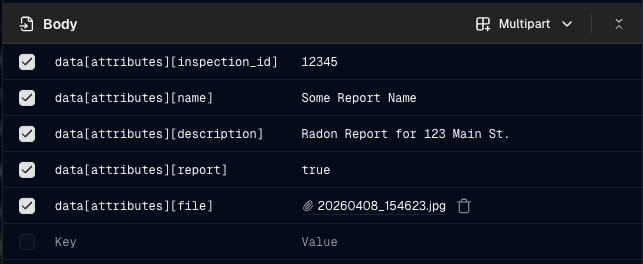
- The call must be sent with content type: multipart. Data must be passed using the key value format data[attributes][fieldname] : value. For the actual file entry, use data[attributes][file].
- Below is an example of how this could look when testing in the dev portal:
Inspections
Access inspection records including property details, scheduling, participants, and status. This is the core transactional object in the Spectora data model.
View Inspections API Reference →
| Method | Endpoint | Description |
|---|---|---|
GET | /v2/inspections | List inspections with filtering and sorting |
GET | /v2/inspections/{id} | Get a single inspection by ID |
Data Model Overview
Understanding how Spectora's data model fits together will help you build more effective integrations.
An Inspection is the central object. Each inspection is associated with one or more Clients (the buyers or homeowners) and one or two Agents (the buying agent and/or selling agent). Agents may belong to Agencies.
Code
The Connection object represents the relationship between an agent and your specific company — the same real estate agent working with multiple inspection companies will have a distinct Connection record at each company, but share a global Agent record.
The Contact object represents the relationship between a client and your specific company — the same client that has employed multiple inspection companies will have a distinct Contact record at each company, but share a global Buyer record.
Get Started
- 1. Obtain your API key here. You will need to have your Spectora login information available or already be logged into Spectora in the same browser.
- 2. Review the Webhook Configuration and set up webhooks to receive event notifications.
- 3. Make a test request to
GET /v2/connectionsto verify authentication and explore your agent data. - 4. Review the API Reference for full endpoint documentation and request/response schemas.
Questions or issues? Reach out to [email protected].